
2023 – Another Year of Successfully Serving the BIM Community

2023 was an exciting year for us! 


We:

  1. Once again achieved our goal of quickly aligning our solutions with the latest and three previous versions of Revit
  2. Met with thousands of BIM enthusiasts in person and virtually
  3. Introduced dozens of new features and updates that deliver even more value to subscribers.


Be sure you are taking advantage of all the hard work we completed in 2023 by visiting this page for the latest Ideate Software solutions!


Ideate Automation Takes the Spotlight!


We highlight details within our 2023 activities below, but we just have to start with the super-star of the year, Ideate Automation. 


Ideate Automation

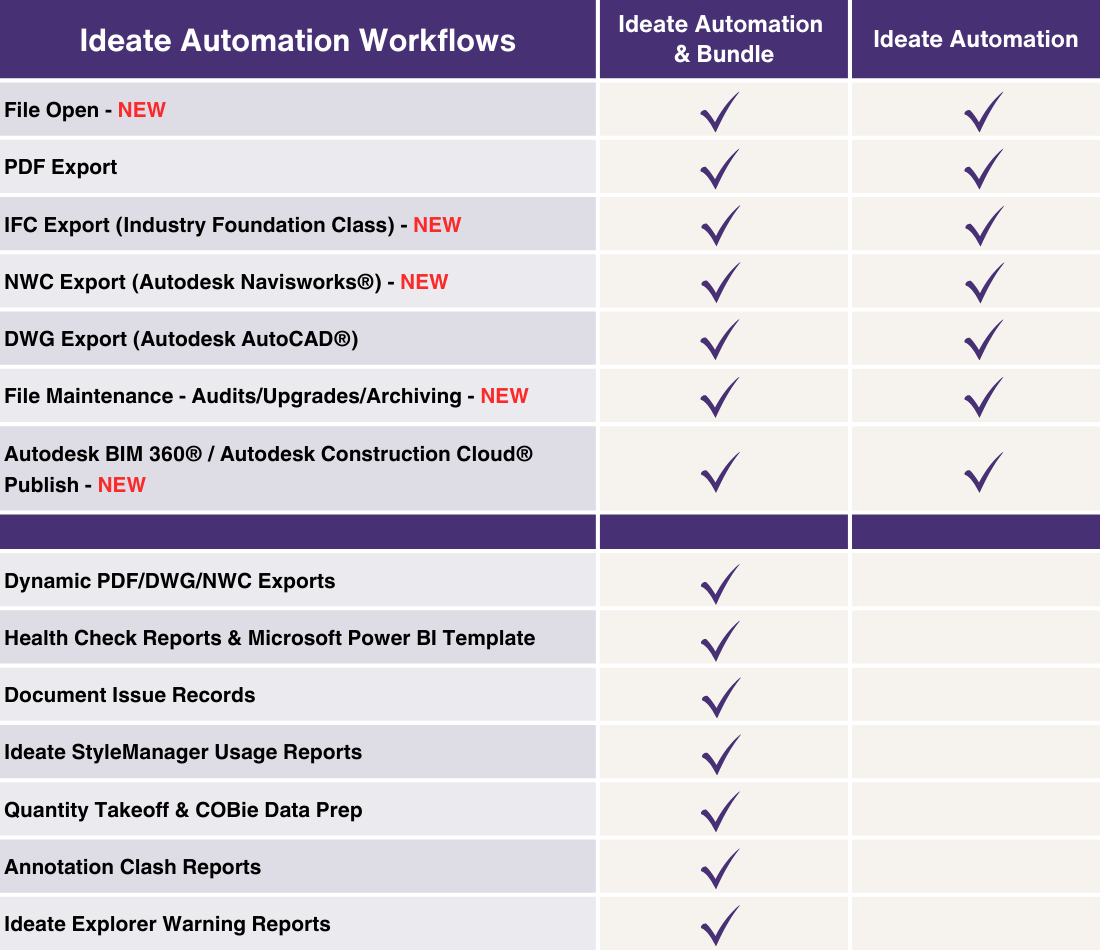
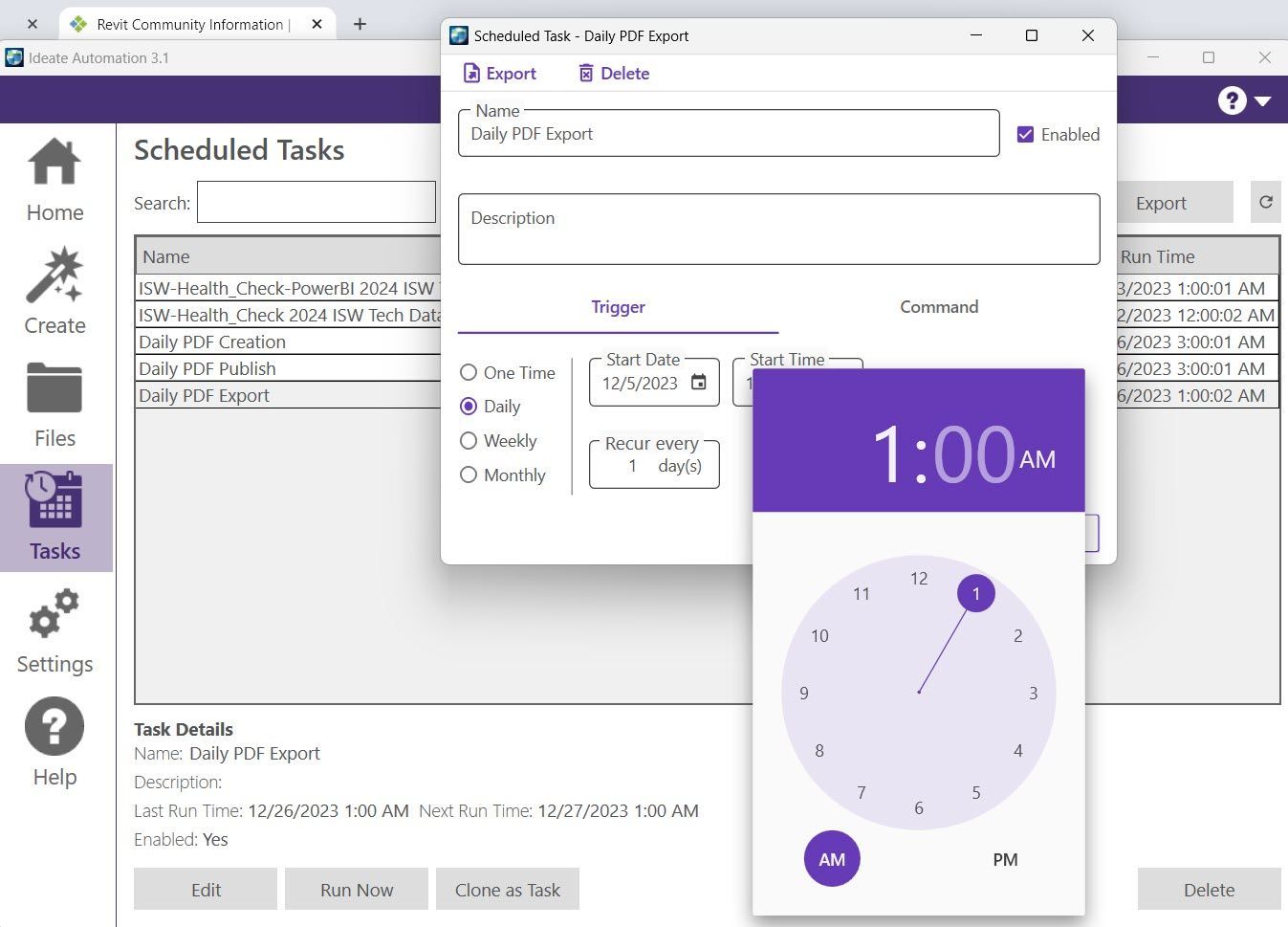
Our latest updates created quite a buzz within the Revit community, even with people who don’t already have Ideate Software products. The partial reason for all the new excitement is because in October, we announced that without consuming any Autodesk Cloud Credits, Ideate Automation can now be used to schedule the opening of large Revit files at a convenient time, like overnight! And if that wasn’t enough, we also announced that Ideate Automation can be used to:

  • Export data from Revit into PDF, DWG, NWC, and IFC formats
  • Publish files to Autodesk BIM 360 as often as daily
  • Run the Revit “audit and compact” process
  • Save Revit models to a specified location
  • Schedule these tasks off-hours
  • …….and so much more!
Ideate Automation Workflows

Many More Enhancements

What's New Video Playlist - Ideate Software

Like every year, we added many customer-requested updates to our products when we aligned them with Revit in May, and we added even more later in the year. To make it easy for customers to learn about the updates, build them into their workflows, and share them with colleagues, we created a “What’s New in Ideate Software” playlist on our You Tube channel and posted several short videos.


There is also a What’s New Help topic under EACH Ideate Software solution. Here is just the latest example from IdeateApps that includes both May and November 2023 updates.  Be sure to read all about the latest features and enhancements within each unique Ideate Software solution by reviewing our latest Help files.

Online Training & Presentations


Our webinars continue to be a favorite learning method for customers. This year we hit an all-time high of 1,500 registrants! We posted links to recordings under the Events tab in our blog posts. 


We continued our Training blog post and Support blog post series in 2023 with dozens of tips on getting the most out of Ideate Software solutions.

Our support team fielded hundreds of questions regarding everything from installation to new feature requests, and almost everything in-between.


Globetrotting


Our team discussed BIM challenges and Ideate Software solutions at many in-person events:


England
Women in BIM
NXT BLD
Revit Data Management Insights Group
Digital Construction Week

France
BIM World Paris

Germany
BIM World Munich

Ireland
BIM Coordinators Summit


Singapore
Build Tech Asia

Switzerland
BIM Day GVA

United States
Autodesk University
Lunch and Learn in San Francisco
Digital Built Week - Americas
San Francisco City Tour
San Francisco AIA Conference
2023 AIA San Francisco Design Awards    
NYC City Tour


In Good Company 

We were honored that the following customers took time out of their busy schedules to share how our products help them achieve their goals. 


  1. Corstorphine & Wright
  2. Environmental Systems Design
  3. Evolve Consultancy – 1
  4. Evolve Consultancy - 2
  5. EwingCole
  6. Goettsch Partners
  7. HPP Architects
  8. Modmation
  9. Parkin Architects
  10. Stantec


Stronger Social Media Presence

We upped our social media game to get the attention of more customers and potential customers.


New videos on YouTube

Images of YouTube Posts


Now on Instagram 

Instagram Post Examples


Fun and valuable prizes! 

Chocolate and Ice Cream Giveaways


Thank you!


As we close out the year, we thank Ideate Software employees, customers, consultants, partners, and others who helped us achieve our 2023 goals. We look forward to 2024 being another year of collaboration, innovation, and success.


Stay current on all our activities in 2024 by following us on X/Twitter, LinkedIn, Facebook, YouTube, and Instagram.


  • What is a Named User license?

    A Named User license is assigned to one specific person rather than shared across a network. For a step-by-step walkthrough, see the License Wizard section of the Graitec Licensing Help Center.

  • Are Ideate Suites replacing Ideate Software Bundles?

    Yes. Going forward, Ideate Suites replace Ideate Software Bundles.

  • What's the difference between the Ideate Software Bundle and the Ideate Suite?

    Both include the same five tools: IdeateApps, Ideate BIMLink, Ideate Explorer, Ideate Sticky and Ideate StyleManager. What changes is how many people can use them at the same time.


    • Bundle: Each tool is licensed separately, so different people can work in different tools at once. For example, with one Bundle, five people could each use a different tool at the same time.
    • Suite: One license covers all five tools for one person at a time. That person can move freely between every tool. While they're using the Suite, it isn't available to anyone else on that license until they finish.

    A Named User Suite is assigned to one specific person. A Cloud Floating Suite can be shared across your team, one person at a time. 


    Bundle to Suite Infographic


  • Will my team need more licenses?

    If several people on your team use different Ideate tools at the same time, you may need more than one Suite license. Contact us and we'll review your team's usage and help you choose the right setup.

  • Can I still buy an Ideate Software Bundle?

    No. Bundles are no longer available for purchase. New purchases are offered as follows:


    • Ideate Suite: Named User or Cloud Floating 
    • Enterprise Suite: Cloud Floating
    • Active Host: Cloud Floating
    • Automation: Cloud Floating
    • Individual products: Named User or Cloud Floating (IdeateApps, Ideate BIMLink, Ideate Explorer, Ideate Sticky, and Ideate StyleManager)
  • Can I still buy IdeateApps, BIMLink, Explorer, Sticky, or StyleManager individually?

    Yes. Individual products are available as Named User or Cloud Floating licenses.

  • Will floating (network) licenses still be available?

    Yes. Cloud Floating licenses are available for Ideate Suite, Enterprise Suite, Active Host, individual products, and Automation.

  • My organization has strict security requirements or no internet access. Can I still get a FlexLM license?

    Yes. FlexLM remains available for organizations with security requirements, such as environments without internet access. FlexLM is not available through the online store, so please contact your account manager to purchase.

  • I'm an existing customer. What happens to my current license/s?

    Your existing Ideate Software subscription is moving to our new licensing system at no cost. Your license quantities and expiration dates stay the same.


    • Standalone licenses become Named User licenses. Set up your Named Users in the Graitec Advantage Portal.
    • Cloud Floating (network) licenses become Cloud Floating Suite licenses. Deploy the latest release as you have in the past, using the new license code in your migration email.
    • Each Ideate Software Bundle becomes an Ideate Suite.

    To keep using Ideate, update to the latest release and activate your new license by March 31, 2027. Older Ideate licenses will stop working in Q2 2027.


    Using Ideate with Revit 2022 or earlier? Contact ideatesupport@graitec.com to review your options. For account questions, contact sales@ideatesoftware.com.


  • I have a Bundle today. What will I receive when I move to the new licensing?

    Conversions are one for one. Each Ideate Software Bundle becomes one Ideate Suite, and each network Bundle becomes one Cloud Floating Suite. Your license quantities and expiration dates stay the same.

  • I have several products that renew on different dates. How will that be handled?

    We're finalizing how to handle accounts with multiple renewal dates. Contact sales@ideatesoftware.com and we'll review your account with you.

  • Where do I manage my licenses?

    In the Graitec Advantage Portal. Based on customer requests, starting with the latest Ideate release, license management and license usage information are handled in Graitec Advantage, outside of Revit. We recommend bookmarking the portal.


    • Named User licenses: Assign licenses to people on your team in Graitec Advantage.
    • Cloud Floating Suite licenses: Deploy the latest release with your new license code as you have in the past, then manage licenses in Graitec Advantage.

    Watch the Graitec Advantage walkthrough


  • Can I transfer a Named User license to another person?

    Yes. There's no limit on the total number of transfers, but each license can be transferred up to two times within a 30-day period.

  • How are licenses issued?

    Each product on your order is issued as its own license once your order is processed. To try a product before buying, contact us to request an evaluation license.

Still have a question?

Contact

Explore recent posts

Smarter Revit Workflows: Lessons from the Field with Grimshaw and Ideate Software
October 21, 2026
TRAINING - WEBINAR | Watch the recording of this session featuring Charleen Chae, BIM Lead for North America, and Tiago Santos, BIM Coordinator in London at Grimshaw Architects, alongside Ninad Garware, Technical Evangelist at Ideate Software, GRAITEC Group.
BladeRoom Cuts Revit Workflow Time by 70% with Ideate Software and Graitec Group
August 27, 2026
CLIENT TESTIMONIAL - ARTICLE | BladeRoom Group, a leader in modular data center construction, was struggling to manage the complexity of large-scale, data-heavy Revit projects without growing their team.
Smarter Control of Complex Revit Engineering Models | Webinar, April 2026
August 25, 2026
TRAINING - VIDEO | In this recorded webinar, see how MEP and structural engineers, BIM managers, and Revit power users can take control of complex models without adding more manual work to their day, using Ideate BIMLink, Ideate Explorer, IdeateApps, Ideate StyleManager, and Ideate Sticky.
What's New in Ideate Software, June 2026 Webinar
August 6, 2026
VIDEO - TRAINING | Watch this webinar to see how Ideate ExportHub, the newest addition to the IdeateApps suite, simplifies Revit export workflows. Learn how to centralize exports, automate batch and scheduled exports, apply intelligent naming rules, and create dynamic sheet and view sets for client deliverables.
Show More