
Looking Back at 2022 – Another Year to Remember at Ideate Software!
In 2022, we once again achieved our goal of quickly aligning our Ideate Software solutions with the latest version of Revit (and 3 previous releases) while introducing new products and features that respond to requests from Revit users:
- Perform time-intensive tasks in the background with Ideate Automation 2.0
- Review 2D annotations and clashes with Ideate Annotate, a new tool within IdeateApps
- Find Revit elements by their respective tag values with Ideate Explorer
- Maintain model health more easily with Ideate BIMLink, Ideate Explorer, Ideate Annotate, and Ideate Automation using our Revit Model Health Check
- Review Revit Parameter information with Ideate StyleManager and Ideate BIMLink
- Publish PDF information with ease using Ideate Automation
In-Person Gatherings Back in the Mix!
For much of our team, the most memorable thing about 2022 was the return of in-person gatherings. After two long years of online-only appointments, meetings, conferences, etc., restrictions lifted and we went to town, literally!
- England - December Revit Data Management Insights Group – London
- Australia - BILT Australia – Gold Coast
- Germany - BIM World - Munich
- England - London Build Expo
- United States - Autodesk University
- Scotland - Women in BIM
- Ireland - BIM Coordinators Summit – Dublin
- United States - BILT North America
- England - May Revit Data Management Insights Group - London
- France - BIM World – Paris
- England – Ideate Software Beta Group Lunch & Learn
- Canada – Toronto City Tour Seminar
Customers Remain Our Priority
Ideate Software invests heavily in ensuring our customers are aware of all the ways our Revit add-ins simplify data management. Here are just a few examples:
Online Training & Presentations
Virtual trainings continue to be a favorite learning method for customers; they appreciate the live meetings to ask questions and the easy access to recordings, which they can refer to often and recommend to colleagues:
- 3 Key Ingredients of a Productive BIM Strategy
- Productivity Enhancing Updates to IdeateApps
- Getting Started with Ideate Automation
- Advanced Revit Model Health
- Wishlist Granted – Top User Requests and Implemented Features
- Online User Group Meeting on Parameters
- Q&A Session with Ideate Software
- Automate Sheet and View Management
Online Events
Online events such as seminars, podcasts, and webinars continued to be popular and a great way for Ideate Software to engage with the greater AECO industry.
- BIMxt November Meeting
- The Architect’s Newspaper webinar for July featuring Managing Revit Sheets and Views
- The Architect’s Newspaper for March featuring Revit Data Management
- BIMThoughts Podcast featuring our ViewCreator Room View Method
- BIMThoughts Podcast on BIM in the UK
Ideate Software in the Press
Answers to Frequently Asked Questions
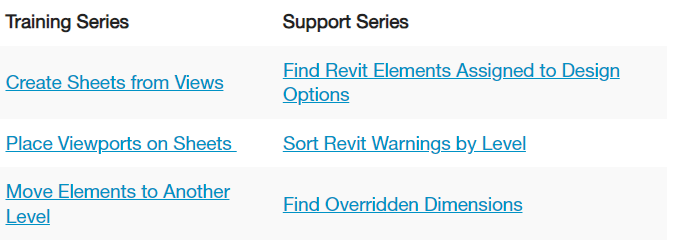
Based on positive comments received in 2021, we continued our Training and Support blog post series, which provide detailed answers to frequent customer questions.
Here are just a few from 2022. Visit Training Series and Support Series for more.
Online Demos of Top 10 Ways to Use Ideate Explorer to Audit Revit Models
To make it easier for customers to get right to the model auditing content they want, we split up the information from our popular webinar, Top 10 Auditing Tips, into 10 very short video demonstrations and posted them on our YouTube channel. Now customers can bookmark the page with all 10 videos and quickly view the ones they need when they need them.
An Outstanding Customer Experience Delivered by an Oustanding Team
The leadership at Ideate Software knows that our success is based on our tremendous employees who take great pride in delivering value to customers, coworkers, the company, and the AECO industry overall.
To thank our employees for their hard work and commitment, the leadership team was pleased to host an employee retreat in Hawaii this year. Team members and family members reconnected after long absences or met in person for the first time and spent some quality time getting to know each other. This team-building event recognized the contributions of the team and energized everyone for continued opportunities to develop and support innovative software for Revit users around the world.
Thank you!
As we close out the year, we send sincere thanks to Ideate Software employees, customers, consultants, partners, and others who helped us achieve our 2022 goals. We look forward to 2023 being another year of collaboration, innovation, and success.
Stay current on all our activities in 2023 by following us on Twitter, LinkedIn, Facebook, and YouTube.
What is a Named User license?
A Named User license is assigned to one specific person rather than shared across a network. For a step-by-step walkthrough, see the License Wizard section of the Graitec Licensing Help Center.
Are Ideate Suites replacing Ideate Software Bundles?
Yes. Going forward, Ideate Suites replace Ideate Software Bundles.
What's the difference between the Ideate Software Bundle and the Ideate Suite?
Both include the same five tools: IdeateApps, Ideate BIMLink, Ideate Explorer, Ideate Sticky and Ideate StyleManager. What changes is how many people can use them at the same time.
- Bundle: Each tool is licensed separately, so different people can work in different tools at once. For example, with one Bundle, five people could each use a different tool at the same time.
- Suite: One license covers all five tools for one person at a time. That person can move freely between every tool. While they're using the Suite, it isn't available to anyone else on that license until they finish.
A Named User Suite is assigned to one specific person. A Cloud Floating Suite can be shared across your team, one person at a time.
Will my team need more licenses?
If several people on your team use different Ideate tools at the same time, you may need more than one Suite license. Contact us and we'll review your team's usage and help you choose the right setup.
Can I still buy an Ideate Software Bundle?
No. Bundles are no longer available for purchase. New purchases are offered as follows:
- Ideate Suite: Named User or Cloud Floating
- Enterprise Suite: Cloud Floating
- Active Host: Cloud Floating
- Automation: Cloud Floating
- Individual products: Named User or Cloud Floating (IdeateApps, Ideate BIMLink, Ideate Explorer, Ideate Sticky, and Ideate StyleManager)
Can I still buy IdeateApps, BIMLink, Explorer, Sticky, or StyleManager individually?
Yes. Individual products are available as Named User or Cloud Floating licenses.
Will floating (network) licenses still be available?
Yes. Cloud Floating licenses are available for Ideate Suite, Enterprise Suite, Active Host, individual products, and Automation.
My organization has strict security requirements or no internet access. Can I still get a FlexLM license?
Yes. FlexLM remains available for organizations with security requirements, such as environments without internet access. FlexLM is not available through the online store, so please contact your account manager to purchase.
I'm an existing customer. What happens to my current license/s?
Your existing Ideate Software subscription is moving to our new licensing system at no cost. Your license quantities and expiration dates stay the same.
- Standalone licenses become Named User licenses. Set up your Named Users in the Graitec Advantage Portal.
- Cloud Floating (network) licenses become Cloud Floating Suite licenses. Deploy the latest release as you have in the past, using the new license code in your migration email.
- Each Ideate Software Bundle becomes an Ideate Suite.
To keep using Ideate, update to the latest release and activate your new license by March 31, 2027. Older Ideate licenses will stop working in Q2 2027.
Using Ideate with Revit 2022 or earlier? Contact ideatesupport@graitec.com to review your options. For account questions, contact sales@ideatesoftware.com.
I have a Bundle today. What will I receive when I move to the new licensing?
Conversions are one for one. Each Ideate Software Bundle becomes one Ideate Suite, and each network Bundle becomes one Cloud Floating Suite. Your license quantities and expiration dates stay the same.
I have several products that renew on different dates. How will that be handled?
We're finalizing how to handle accounts with multiple renewal dates. Contact sales@ideatesoftware.com and we'll review your account with you.
Where do I manage my licenses?
In the Graitec Advantage Portal. Based on customer requests, starting with the latest Ideate release, license management and license usage information are handled in Graitec Advantage, outside of Revit. We recommend bookmarking the portal.
- Named User licenses: Assign licenses to people on your team in Graitec Advantage.
- Cloud Floating Suite licenses: Deploy the latest release with your new license code as you have in the past, then manage licenses in Graitec Advantage.
Watch the Graitec Advantage walkthrough
Can I transfer a Named User license to another person?
Yes. There's no limit on the total number of transfers, but each license can be transferred up to two times within a 30-day period.
How are licenses issued?
Each product on your order is issued as its own license once your order is processed. To try a product before buying, contact us to request an evaluation license.
Still have a question?
Explore recent posts