
The Importance of Submitting Feature Requests to Software Developers
I’m constantly reminded of the importance of playing an active role in the success of software development.
This role is not limited to the work that we do at Ideate Software; it extends far beyond. For me personally, I am all about the experience and usability of software. It needs to be intuitive. It must have a clean look, great feel, and be easy to navigate. When a user generates an error, the software should clearly define what the error is and suggest ways to resolve the error. If software is lacking features, I log feature requests to improve the software, otherwise I move on to something else that works better.
We can all probably agree that no software is perfect. While software may meet most of our needs, there will certainly be features and workflows that are missing or underdeveloped. Whenever I see the opportunity to speak up and log a feature request, I do so. Not only do I log feature requests internally for our own products, I also log feature requests to Autodesk via the forums and to mobile app developers, either directly through their website or from the feedback section in the app store. The goal in doing so is to help the developers understand the needs of the consumer, rather than just assume they know what the consumers’ needs are.
A feature request that I logged with Autodesk a few years back was recently implemented into Revit (starting in Revit 2020.2). This feature request involved showing a marker for Revit’s Internal Origin point (I love the Revit coordinate system!) and markers for linked files Internal Origin, Survey, and Project Base points as well. Instead of just requesting this feature, I took a few extra moments and explained why this feature would be beneficial. Here is the feature request itself and the notation that it was implemented by Autodesk:
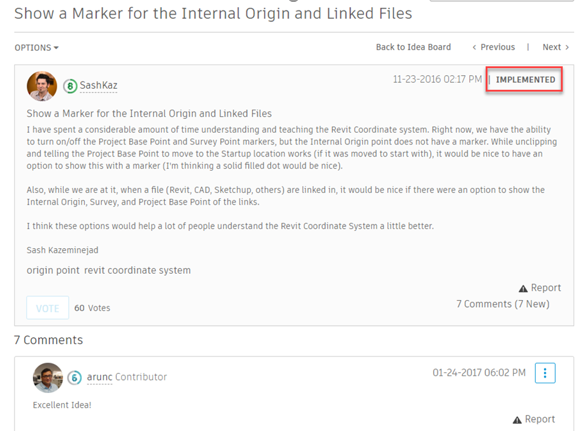
Feature requests like these are important to log with software developers, as they typically address pain points and ways that they can improve the users experience.
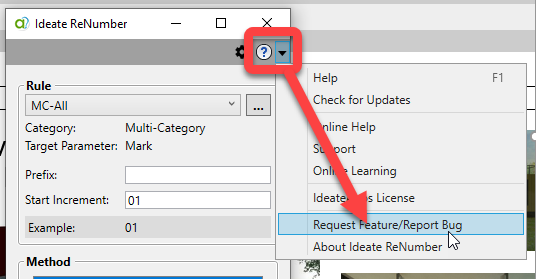
Ideate Software customers should log feature requests through the Help menu as shown below.
At Ideate Software, we are continually looking for ways in which we can improve our software, whether it be improvements to our current software products or new product ideas. Each feature request that we receive, whether from our website, through our technical support system, or from our Beta program, is logged into our system and carefully reviewed. I always tell our customers and prospects that our software is great because of the wants and needs of our customers, not the wants and needs of ourselves. If you ever feel like your requests to others are never heard, you can take comfort in knowing that we log all requests and discuss them in full detail.
On behalf of our entire team, thank you so much for being an active part of what we do. We are very proud of the quality and service that we provide to all our current and future customers. Keep those feature requests coming!
What is a Named User license?
A Named User license is assigned to one specific person rather than shared across a network. For a step-by-step walkthrough, see the Graitec Licensing Help Center - Named User.
Are Ideate Suites replacing Ideate Software Bundles?
Yes. Going forward, Ideate Suites replace Ideate Software Bundles.
What's the difference between the Ideate Software Bundle and the Ideate Suite?
Both include the same five tools: IdeateApps, Ideate BIMLink, Ideate Explorer, Ideate Sticky and Ideate StyleManager.
- Bundle: Each tool is licensed separately, so different people can work in different tools at once. For example, with one Bundle, five people could each use a different tool at the same time.
- Suite: One license covers all five tools for one person at a time. That person can move freely between every tool. While they're using the Suite, it isn't available to anyone else on that license until they finish.
A Named User Suite is assigned to one specific person. A single Network Cloud Floating Suite can be shared across your team, one person at a time.
Will my team need more licenses?
If several people on your team use different Ideate tools at the same time, you may need more than one Suite license. Contact us and we'll review your team's usage and help you choose the right setup.
Can I still buy an Ideate Software Bundle?
No. Bundles are no longer available for purchase. New purchases are offered as follows:
- Ideate Suite: Named User or Network Cloud Floating
- Enterprise Suite: Network Cloud Floating
- Active Host: Network Cloud Floating
- Automation: Network Cloud Floating
- Individual products: Named User or Network Cloud Floating (IdeateApps, Ideate BIMLink, Ideate Explorer, Ideate Sticky, and Ideate StyleManager)
Can I still buy IdeateApps, BIMLink, Explorer, Sticky, or StyleManager individually?
Yes. Individual products are available as Named User or Cloud Floating licenses until the new product lineup launches with the next major release, expected mid-2027.
Will floating (network) licenses still be available?
Yes. FlexLM remains available for organizations with security requirements, such as environments without internet access. FlexLM is not available through the online store, so please contact your account manager to purchase.
My organization has strict security requirements or no internet access. Can I still get a FlexLM license?
Yes. FlexLM remains available for organizations with security requirements, such as environments without internet access. FlexLM is not available through the online store, so please contact your account manager to purchase.
I'm an existing customer. What happens to my current license/s?
Your existing Ideate Software subscription is moving to our new licensing system at no cost. Your license quantities and expiration dates stay the same.
- Standalone licenses become Named User licenses. Set up your Named Users in the Graitec Advantage Portal.
- Cloud Floating (network) licenses become Network Cloud Floating Suite licenses. Deploy the latest release as you have in the past, using the new license code in your migration email.
- Each Ideate Software Bundle becomes an Ideate Suite.
To keep using Ideate, update to the latest release and activate your new license by March 31, 2027. Older Ideate licenses will stop working in Q2 2027.
Using Ideate with Revit 2022 or earlier? Contact ideatesupport@graitec.com to review your options. For account questions, contact sales@ideatesoftware.com.
I have a Bundle today. What will I receive when I move to the new licensing?
Conversions are one for one. Each Ideate Software Bundle becomes one Ideate Suite, and each network Bundle becomes one Network Cloud Floating Suite. Your license quantities and expiration dates stay the same.
Where do I manage my licenses?
In the Graitec Advantage Portal. Based on customer requests, starting with the latest Ideate release, license management and license usage information are handled in Graitec Advantage, outside of Revit. We recommend bookmarking the portal.
- Named User licenses: Assign licenses to people on your team in Graitec Advantage.
- Cloud Floating Suite licenses: Deploy the latest release with your new license code as you have in the past, then manage licenses in Graitec Advantage.
Watch the Graitec Advantage walkthrough
Can I transfer a Named User license to another person?
Yes. There's no limit on the total number of transfers, but each license can be transferred up to two times within a 30-day period.
How are licenses issued?
Each product on your order is issued as its own license once your order is processed. To try a product before buying, contact us to request an evaluation license.
I want to try the Graitec AI Assistant now, but I don’t have my new license code yet. What should I do?
Existing customers: We’re delivering new license codes to existing subscribers on a rolling basis over the next few weeks. If you need access sooner, contact your Graitec sales representative.
New customers: The Graitec AI Assistant isn’t available in the Ideate trial. Contact your Graitec sales representative to request an evaluation license or purchase a 6-month subscription.
Still have a question?
Explore recent posts