
Kumpen Improves Communication with Ideate BIMLink
Founded in 1945, Kumpen has been a fixture in the construction industry for more than 70 years. Its activities include construction, infrastructure fit renovations, real estate development, tunneling, and private-public partnerships. By putting people first, Kumpen creates a collaborative atmosphere in which ambitious employees anticipate challenges and address needs on increasingly complex projects.
Kumpen uses Ideate BIMLink to update and change Autodesk® Revit® data with integrity and speed. It also uses the software to communicate in an innovative and productive fashion.
Ideate BIMLink as a Communication System
“After graduating as a civil engineer, I started as a contractor’s foreman with Kumpen,” said Ms. Sien van der Have. “Later, I became the BIM-coordinator, and today I am the BIM manager. After working with Ideate BIMLink, the Kumpen BIM team and I realized that it was the perfect tool to use to solve the challenge of working with architects and engineers who only work in 2D.” Ideate BIMLink allows users to move data from a Revit file into Microsoft Excel, so even those who don’t work in Revit can easily edit and update the model.
Two Examples of how Kumpen used Ideate BIMLink to Streamline Workflows, Reduce Errors, and Improve Model Quality
- India-Natie Project
“For our India-Natie project in Antwerp, we created a BIM model,” explained Ms. van der Have. “The architect and engineer drew in 2D. While creating the building model, several conflicts would only be noticed on site.”
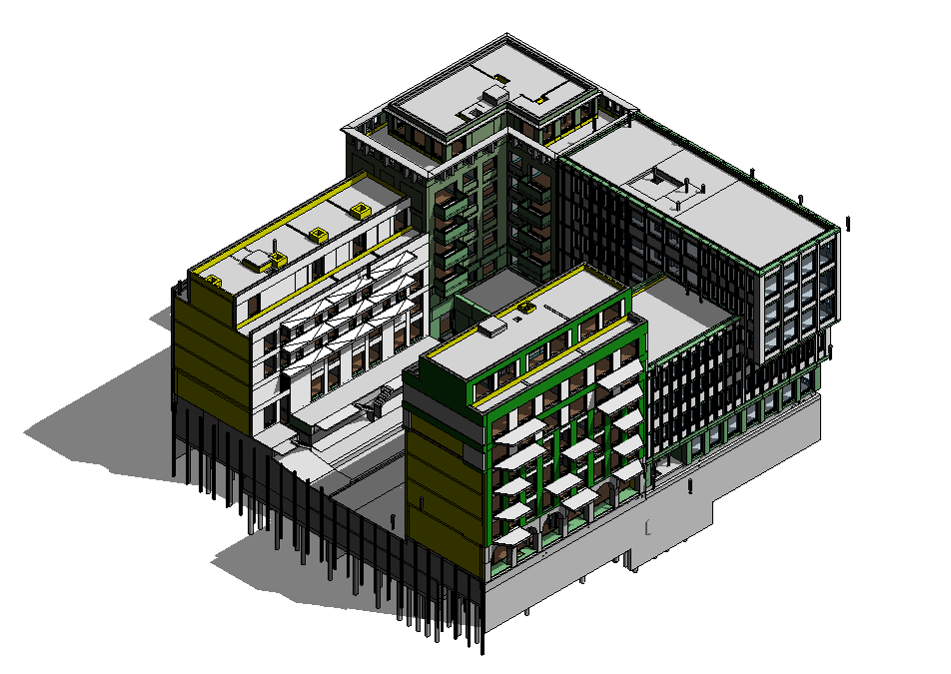
“For every question or remark we had, we placed a nurse call device (NCD) in the model. At one point, there were more than 700 NCDs in the model.” For every NCD, Kumpen had to fill in the following parameters:
- RI-number: A unique number for every remark
- RI-comment: A question that need to be addressed
- RI-comment_to: The name of the person that should address the questions
“Because the architect and engineer weren’t familiar with BIM, we needed to find a communication system that did not require knowledge of BIM. Ideate BIMLink was our solution. We exported our schedules from Revit to an Excel file that anyone could work with. Our next step was to place the Excel on SharePoint, an online document-sharing platform.”
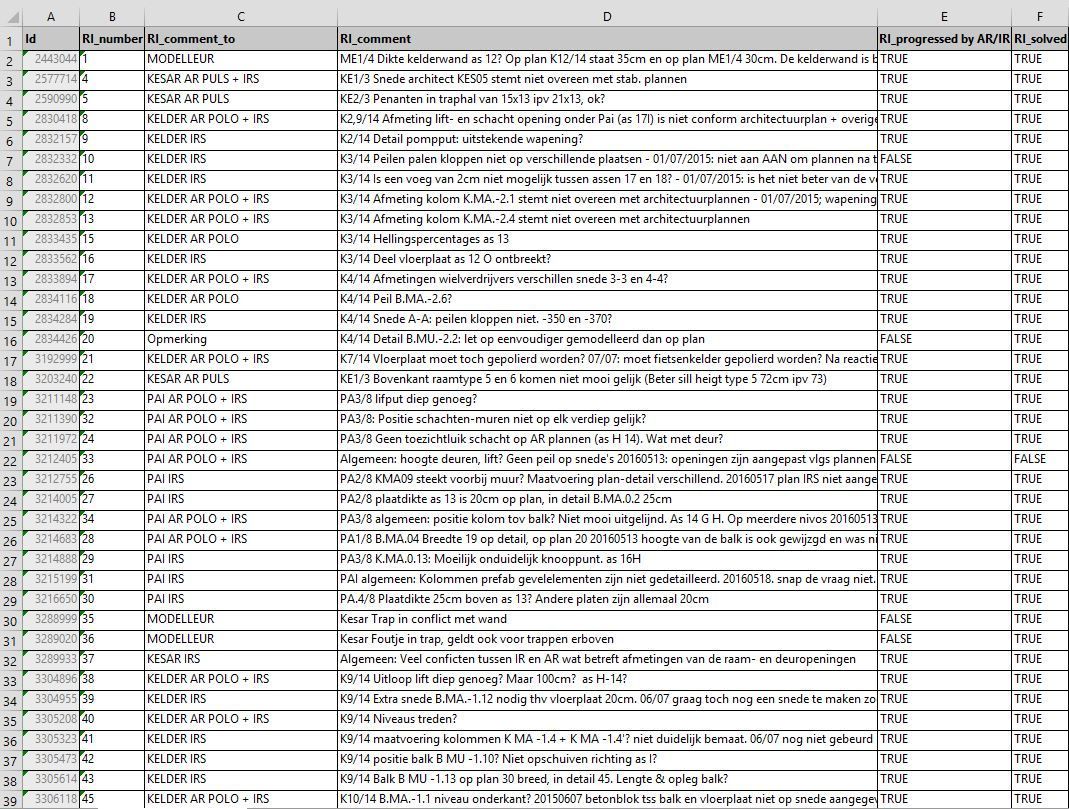
“The architect or engineer found only the questions intended for him/her by filtering on the parameter ‘RI_comment_to.’ They could respond by filling in the parameter ‘RI_discussed.’ Because the Excel file was placed on an online platform, everyone was able work in it at the same time.”
Then Kumpen imports the Excel file containing the architect/ engineer answers into Ideate BIMLink, which automatically generates a file that shows all the changes.
“This is a very handy and safe way to check all the changes. This whole method of working takes place before the building process begins, ensuring that fewer mistakes occur on site and significantly reducing costly mistakes.”
2. Measure Realized Quantities
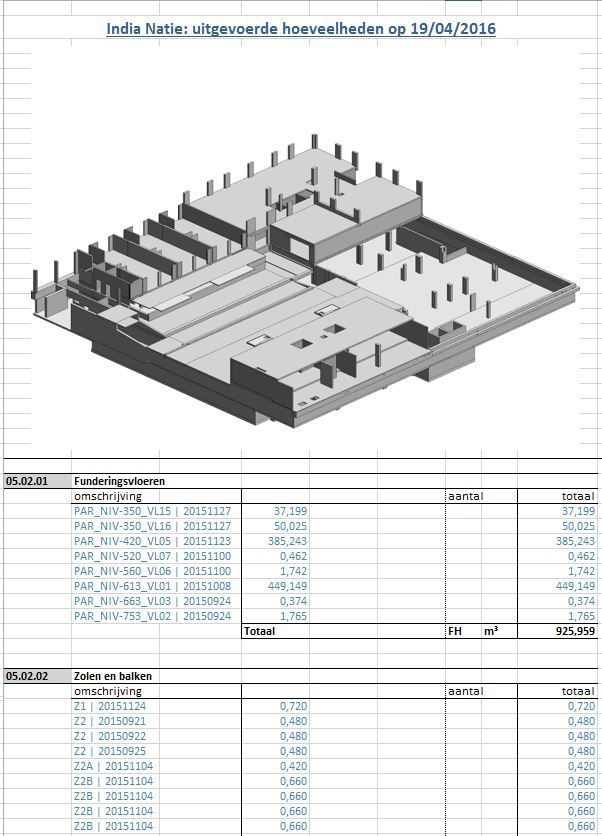
In addition to using Ideate BIMLink to change data quickly, Kumpen uses it to measure the realized quantities.
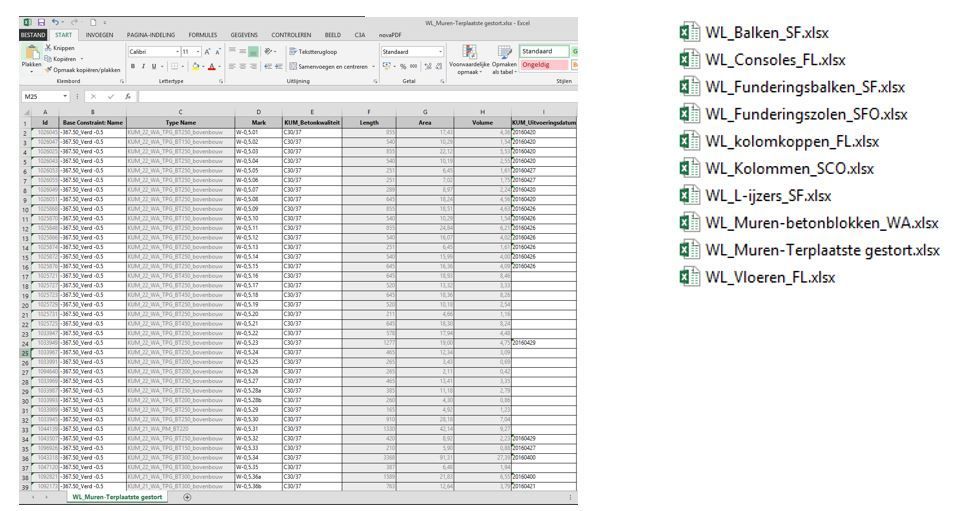
"We create an Excel file with all the quantities, and we pass the file to the foreman. The foreman fills in the parameter ‘date.’ When he has done that, we import the new data into Revit with Ideate BIMLink,” said Ms. van der Have.
“This permits us to generate quantity surveys of the realized quantities. Ideate BIMlink is saving us time in so many ways, and you know, time is money.”
About Ideate Software
Ideate Software develops tools to provide Revit users in the architecture, engineering, construction, and owner industries with unprecedented control over their data and to solve persistent workflow problems. Its solutions include Ideate Sticky, Ideate Explorer, Ideate BIMLink, and IdeateApps. They enable Revit users to save time, increase accuracy, improve project deliverables, and elevate design.
What is a Named User license?
A Named User license is assigned to one specific person rather than shared across a network. For a step-by-step walkthrough, see the License Wizard section of the Graitec Licensing Help Center.
Are Ideate Suites replacing Ideate Software Bundles?
Yes. Going forward, Ideate Suites replace Ideate Software Bundles.
What's the difference between the Ideate Software Bundle and the Ideate Suite?
Both include the same five tools: IdeateApps, Ideate BIMLink, Ideate Explorer, Ideate Sticky and Ideate StyleManager. What changes is how many people can use them at the same time.
- Bundle: Each tool is licensed separately, so different people can work in different tools at once. For example, with one Bundle, five people could each use a different tool at the same time.
- Suite: One license covers all five tools for one person at a time. That person can move freely between every tool. While they're using the Suite, it isn't available to anyone else on that license until they finish.
A Named User Suite is assigned to one specific person. A Cloud Floating Suite can be shared across your team, one person at a time.
Will my team need more licenses?
If several people on your team use different Ideate tools at the same time, you may need more than one Suite license. Contact us and we'll review your team's usage and help you choose the right setup.
Can I still buy an Ideate Software Bundle?
No. Bundles are no longer available for purchase. New purchases are offered as follows:
- Ideate Suite: Named User or Cloud Floating
- Enterprise Suite: Cloud Floating
- Active Host: Cloud Floating
- Automation: Cloud Floating
- Individual products: Named User or Cloud Floating (IdeateApps, Ideate BIMLink, Ideate Explorer, Ideate Sticky, and Ideate StyleManager)
Can I still buy IdeateApps, BIMLink, Explorer, Sticky, or StyleManager individually?
Yes. Individual products are available as Named User or Cloud Floating licenses.
Will floating (network) licenses still be available?
Yes. Cloud Floating licenses are available for Ideate Suite, Enterprise Suite, Active Host, individual products, and Automation.
My organization has strict security requirements or no internet access. Can I still get a FlexLM license?
Yes. FlexLM remains available for organizations with security requirements, such as environments without internet access. FlexLM is not available through the online store, so please contact your account manager to purchase.
I'm an existing customer. What happens to my current license/s?
Your existing Ideate Software subscription is moving to our new licensing system at no cost. Your license quantities and expiration dates stay the same.
- Standalone licenses become Named User licenses. Set up your Named Users in the Graitec Advantage Portal.
- Cloud Floating (network) licenses become Cloud Floating Suite licenses. Deploy the latest release as you have in the past, using the new license code in your migration email.
- Each Ideate Software Bundle becomes an Ideate Suite.
To keep using Ideate, update to the latest release and activate your new license by March 31, 2027. Older Ideate licenses will stop working in Q2 2027.
Using Ideate with Revit 2022 or earlier? Contact ideatesupport@graitec.com to review your options. For account questions, contact sales@ideatesoftware.com.
I have a Bundle today. What will I receive when I move to the new licensing?
Conversions are one for one. Each Ideate Software Bundle becomes one Ideate Suite, and each network Bundle becomes one Cloud Floating Suite. Your license quantities and expiration dates stay the same.
I have several products that renew on different dates. How will that be handled?
We're finalizing how to handle accounts with multiple renewal dates. Contact sales@ideatesoftware.com and we'll review your account with you.
Where do I manage my licenses?
In the Graitec Advantage Portal. Based on customer requests, starting with the latest Ideate release, license management and license usage information are handled in Graitec Advantage, outside of Revit. We recommend bookmarking the portal.
- Named User licenses: Assign licenses to people on your team in Graitec Advantage.
- Cloud Floating Suite licenses: Deploy the latest release with your new license code as you have in the past, then manage licenses in Graitec Advantage.
Watch the Graitec Advantage walkthrough
Can I transfer a Named User license to another person?
Yes. There's no limit on the total number of transfers, but each license can be transferred up to two times within a 30-day period.
How are licenses issued?
Each product on your order is issued as its own license once your order is processed. To try a product before buying, contact us to request an evaluation license.
Still have a question?
Explore recent posts