
What’s New in Ideate Automation 3.4: Streamlining Revit Workflows Like Never Before
The release of Ideate Automation 3.4 enhances Revit workflows and is packed with several new features designed to dramatically improve Revit file BIM data parameter management, including localization, enhanced file handling, and powerful batch operations for Revit project and family files.
Compatible with Autodesk® Revit® versions 2023–2026, these new capabilities help architecture, engineering, construction, and owner (AECO) teams reduce manual effort, eliminate errors, and streamline repetitive tasks.
Glynnis Patterson, Create Solution Line Vice President at Ideate Software, Graitec Group, shared her excitement about the release: "With Ideate Automation 3.4, we’ve taken another big step toward simplifying complex Revit workflows. These new features empower our users to save time, reduce errors, and focus on what they do best in designing and delivering exceptional projects."
Key Enhancements in Ideate Automation 3.4
Now Localized for our clients Globally!
Ideate Automation is now localized in French, German, Spanish, Czech, Italian, Polish, Japanese, Korean, and Chinese (simplified)! The software will automatically run in the language set as your Windows language preference, making it more accessible to users worldwide.
Popup Suppression
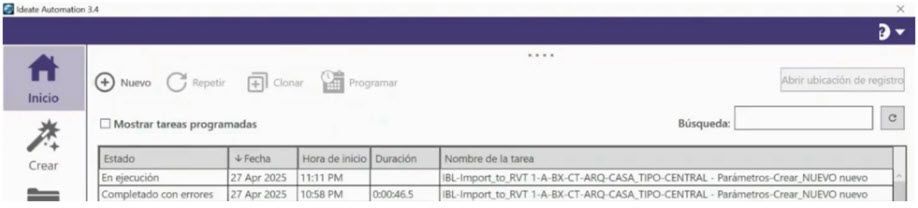
Ideate Automation now includes the ability to suppress non-Revit popups during file open, such as those triggered by Autodesk Desktop Connector. This enhancement ensures a smoother and more reliable automation process by preventing interruptions that would otherwise require manual dismissal, helping tasks run unattended from start to finish.
Open Revit Files by File Name
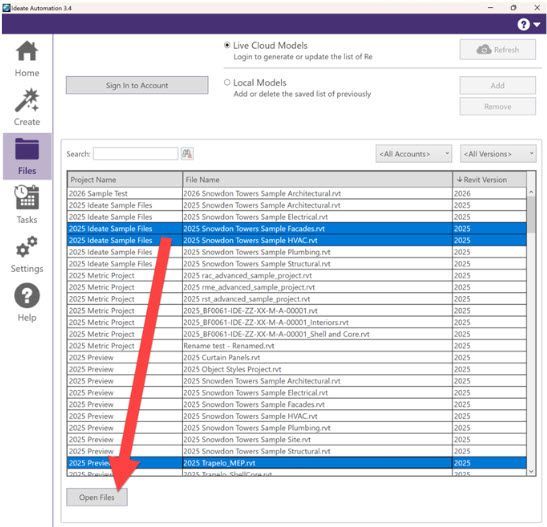
By popular demand, you can now open Revit files directly by specifying the file name through the user interface. This eliminates the need to build a task, simplifying workflows, and saving time.
Open Any File Format
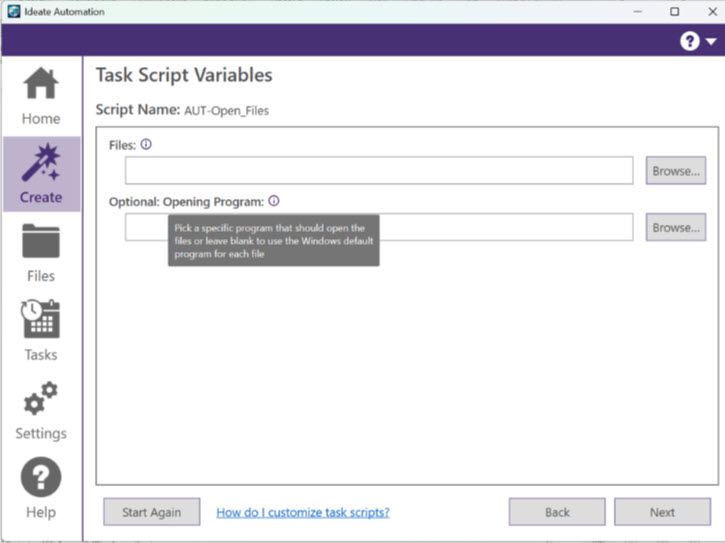
The new script, “AUT-Open_Files,” allows you to open a variety of file formats, including Adobe InDesign, Microsoft PowerBI, AutoCAD, and NWC files. This feature expands Ideate Automation’s utility beyond Revit, making it a versatile tool for your entire project ecosystem.
Export with Custom File Naming
The new “NUM-Export_DWG” script addresses Revit’s limitations in custom file naming. By leveraging Ideate ReNumber, you can now automate exports with predefined naming rules that comply with industry standards like ISO 19650. For example, DWG exports can automatically include sheet numbers, sheet names, and discipline codes (e.g., A101_Cover Page_ARCH.dwg). This feature eliminates manual renaming, ensuring consistency, and saving time.
Learn more about this feature HERE!
New Data Management Folder for Bulk Updates
We’ve added a NEW Data Management folder to support bulk parameter creation and BIMLink data import for updates across multiple Revit families (RFA) and projects (RVT). You now have robust tools to manage parameters and update data at scale.
Batch Create and Update Parameters – RFA
Automate the bulk creation and updating of parameters in Revit Family (.RFA) files. By managing data in Excel with Ideate BIMLink and importing it via Ideate Automation, you can accelerate family parameter setup, reduce errors, and ensure accurate scheduling.
Learn more about this feature HERE!
Batch Create Elements and Update Parameter Values – RVT
This feature enables bulk creation of elements and editing of parameter values across multiple Revit Project (.RVT) files. It ensures consistency and saves time by automating updates to project data without manual intervention.
Learn more about this feature HERE!
Batch Create Materials, Object Styles, and Line Styles
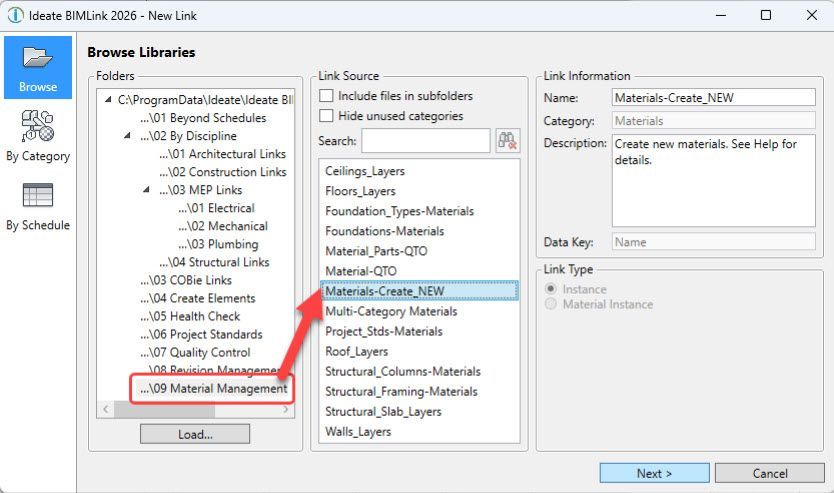
Ideate Automation now supports the ability to import data back into Revit models via Ideate BIMLink, making it possible to batch create elements across multiple files -automatically. With the new import feature, you can generate Materials, Object Styles, Line Styles, and more, without opening or manually editing each model.
Whether you're rolling out firm-wide graphic standards or updating project templates, this enhancement ensures accuracy, consistency, and significant time savings at scale. Just define your standards in Ideate BIMLink, and let Ideate Automation do the heavy lifting across as many Revit files as needed.
Learn more about how Ideate BIMLink now supports the creation of new Materials, Object Styles, and Line Styles.
What is a Named User license?
A Named User license is assigned to one specific person rather than shared across a network. For a step-by-step walkthrough, see the Graitec Licensing Help Center - Named User.
Are Ideate Suites replacing Ideate Software Bundles?
Yes. Going forward, Ideate Suites replace Ideate Software Bundles.
What's the difference between the Ideate Software Bundle and the Ideate Suite?
Both include the same five tools: IdeateApps, Ideate BIMLink, Ideate Explorer, Ideate Sticky and Ideate StyleManager.
- Bundle: Each tool is licensed separately, so different people can work in different tools at once. For example, with one Bundle, five people could each use a different tool at the same time.
- Suite: One license covers all five tools for one person at a time. That person can move freely between every tool. While they're using the Suite, it isn't available to anyone else on that license until they finish.
A Named User Suite is assigned to one specific person. A single Network Cloud Floating Suite can be shared across your team, one person at a time.
Will my team need more licenses?
If several people on your team use different Ideate tools at the same time, you may need more than one Suite license. Contact us and we'll review your team's usage and help you choose the right setup.
Can I still buy an Ideate Software Bundle?
No. Bundles are no longer available for purchase. New purchases are offered as follows:
- Ideate Suite: Named User or Network Cloud Floating
- Enterprise Suite: Network Cloud Floating
- Active Host: Network Cloud Floating
- Automation: Network Cloud Floating
- Individual products: Named User or Network Cloud Floating (IdeateApps, Ideate BIMLink, Ideate Explorer, Ideate Sticky, and Ideate StyleManager)
Can I still buy IdeateApps, BIMLink, Explorer, Sticky, or StyleManager individually?
Yes. Individual products are available as Named User or Cloud Floating licenses until the new product lineup launches with the next major release, expected mid-2027.
Will floating (network) licenses still be available?
Yes. FlexLM remains available for organizations with security requirements, such as environments without internet access. FlexLM is not available through the online store, so please contact your account manager to purchase.
My organization has strict security requirements or no internet access. Can I still get a FlexLM license?
Yes. FlexLM remains available for organizations with security requirements, such as environments without internet access. FlexLM is not available through the online store, so please contact your account manager to purchase.
I'm an existing customer. What happens to my current license/s?
Your existing Ideate Software subscription is moving to our new licensing system at no cost. Your license quantities and expiration dates stay the same.
- Standalone licenses become Named User licenses. Set up your Named Users in the Graitec Advantage Portal.
- Cloud Floating (network) licenses become Network Cloud Floating Suite licenses. Deploy the latest release as you have in the past, using the new license code in your migration email.
- Each Ideate Software Bundle becomes an Ideate Suite.
To keep using Ideate, update to the latest release and activate your new license by March 31, 2027. Older Ideate licenses will stop working in Q2 2027.
Using Ideate with Revit 2022 or earlier? Contact ideatesupport@graitec.com to review your options. For account questions, contact sales@ideatesoftware.com.
I have a Bundle today. What will I receive when I move to the new licensing?
Conversions are one for one. Each Ideate Software Bundle becomes one Ideate Suite, and each network Bundle becomes one Network Cloud Floating Suite. Your license quantities and expiration dates stay the same.
Where do I manage my licenses?
In the Graitec Advantage Portal. Based on customer requests, starting with the latest Ideate release, license management and license usage information are handled in Graitec Advantage, outside of Revit. We recommend bookmarking the portal.
- Named User licenses: Assign licenses to people on your team in Graitec Advantage.
- Cloud Floating Suite licenses: Deploy the latest release with your new license code as you have in the past, then manage licenses in Graitec Advantage.
Watch the Graitec Advantage walkthrough
Can I transfer a Named User license to another person?
Yes. There's no limit on the total number of transfers, but each license can be transferred up to two times within a 30-day period.
How are licenses issued?
Each product on your order is issued as its own license once your order is processed. To try a product before buying, contact us to request an evaluation license.
I want to try the Graitec AI Assistant now, but I don’t have my new license code yet. What should I do?
Existing customers: We’re delivering new license codes to existing subscribers on a rolling basis over the next few weeks. If you need access sooner, contact your Graitec sales representative.
New customers: The Graitec AI Assistant isn’t available in the Ideate trial. Contact your Graitec sales representative to request an evaluation license or purchase a 6-month subscription.
Still have a question?
Explore recent posts