
Mead & Hunt Working Comfortably with Excel-Generated Calculations with Ideate Sticky
Mead & Hunt, a national company with more than 500 employee-owners in 30+ offices nationwide, offers a wide variety of architectural engineering design and planning services. The company's vision is not only to offer excellence to their clients, but also to pass a strong business along to its next generation of employee-owners. To that effect, Mead & Hunt uses Ideate Sticky software to easily bridge a generational gap between its wisest, most experienced engineers and its newest, tech-savvy designers, planners, and technicians.
At Mead & Hunt, valuable real-world expertise resides with the more senior engineers who have developed and refined their calculation methods over decades. At the same time, the more junior engineers at Mead & Hunt work intuitively within the parameters of Autodesk Revit.
Ideate Sticky lets everyone work comfortably with Microsoft Excel-generated calculations while still being efficient in Revit.
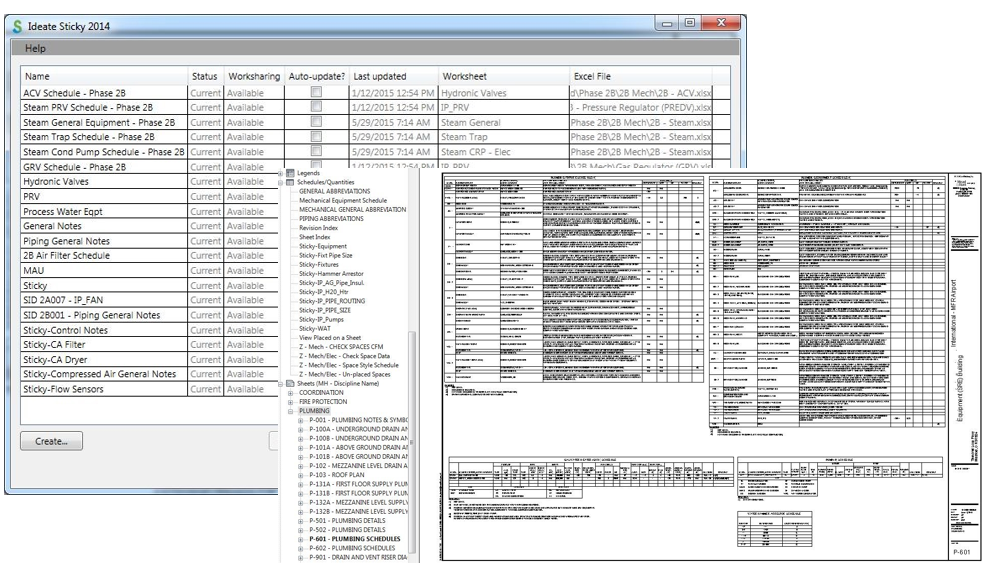
“On most of our projects, the senior-level project engineers and architects use Ideate Sticky to work hand in hand with the junior designers, who live and breathe Revit,” says Dan Dankert, CAD/BIM Manager at Mead & Hunt for ten years. “Ideate Sticky makes a picture of the Excel file so you can view it phenomenally quickly. It seems transparent to its users, and most importantly, it is trusted by users.”
“Some senior engineers are cautious with Revit calculations for mechanical and plumbing, not because they distrust Revit but because they have always worked a certain way such as left-to-right, and some Revit ways seem like the reverse. Our junior people use Ideate Sticky to bring in schedules created by more senior engineers.”
Looks Exactly Like Excel Schedules
Roughly 75 percent of Mead & Hunt projects involve some use of Ideate Sticky. “It does exactly what we need it to do,” says Jon Tiede, Senior Mechanical and Technical Designer at Mead & Hunt. “Ideate Sticky is one of our most utilized Revit add-in tools. Our engineers need the picture of the Excel file to look exactly like their schedule, and in Ideate Sticky, it does. To have the same proportions and formatting builds their trust: they are confident that their data is well-represented in the file.”
One software feature that both Dankert and Tiede appreciate is Ideate Sticky’s support of colors and cell color fills.
“We use cell color fill on areas of change in schedules to highlight important or recent information and make it more visible to the people who read it. The color makes it stand out,” says Dankert. Tiede agrees. “Schedules will inevitably change during construction, and we’ll know what’s been changed thanks to the shading.”
Trustworthy Automatic Updates
The engineers trust that Ideate Sticky information will be automatically updated when it is opened or printed. “It’s automatic so it doesn’t add to our process time or decrease our efficiency. The interface is clear, it’s simple to use. It just works. That lets our people concentrate on other parts of the project.”

Developing Ideate Sticky with Customer Input
Dankert has long been active in Autodesk user groups, and was a speaker at Autodesk University 2014. He and the Ideate technology team communicated frequently as the Ideate Sticky software was developed. “We met several times to explore processes that would benefit Mead & Hunt and might thus benefit others.” Dankert's team also explored software from other companies. “We never knew if and when the other software would break, only that it would. You can’t launch a project with automatic updating that may or may not work.”
One benefit of Ideate Sticky is the speed with which it reads a schedule from Excel. “Because the Sticky is related to a native Revit element, Revit recognizes it almost as its own schedule,” says Tiede. “We can bring in 30 schedules, loading up our project with Excel files and not encounter any issues.”
Ideate Sticky Used Outside of Engineering
Mead & Hunt also uses Ideate Sticky for early design guidelines, keeping client-specific requests front and center for the designers. Sticky schedules also hold upfront code schedules and lifesafety information, such as length requirements for exits, fire alarms, local building code guidelines for sprinklers, and nurse-call information. “This information doesn’t originate in Revit, but it must be referenced in Revit,” says Dankert. “And there’s a surprising amount of that [non-BIM] data.”
About Ideate Software
Ideate Software allows Revit users to have unprecedented control over their data and solve persistent problems in Architecture, Engineering, Construction, and Owner (AECO) workflows. Ideate Software solutions enable Revit users to save time, increase accuracy, improve project deliverables, and elevate design.
What is a Named User license?
A Named User license is assigned to one specific person rather than shared across a network. For a step-by-step walkthrough, see the Graitec Licensing Help Center - Named User.
Are Ideate Suites replacing Ideate Software Bundles?
Yes. Going forward, Ideate Suites replace Ideate Software Bundles.
What's the difference between the Ideate Software Bundle and the Ideate Suite?
Both include the same five tools: IdeateApps, Ideate BIMLink, Ideate Explorer, Ideate Sticky and Ideate StyleManager.
- Bundle: Each tool is licensed separately, so different people can work in different tools at once. For example, with one Bundle, five people could each use a different tool at the same time.
- Suite: One license covers all five tools for one person at a time. That person can move freely between every tool. While they're using the Suite, it isn't available to anyone else on that license until they finish.
A Named User Suite is assigned to one specific person. A single Network Cloud Floating Suite can be shared across your team, one person at a time.
Will my team need more licenses?
If several people on your team use different Ideate tools at the same time, you may need more than one Suite license. Contact us and we'll review your team's usage and help you choose the right setup.
Can I still buy an Ideate Software Bundle?
No. Bundles are no longer available for purchase. New purchases are offered as follows:
- Ideate Suite: Named User or Network Cloud Floating
- Enterprise Suite: Network Cloud Floating
- Active Host: Network Cloud Floating
- Automation: Network Cloud Floating
- Individual products: Named User or Network Cloud Floating (IdeateApps, Ideate BIMLink, Ideate Explorer, Ideate Sticky, and Ideate StyleManager)
Can I still buy IdeateApps, BIMLink, Explorer, Sticky, or StyleManager individually?
Yes. Individual products are available as Named User or Cloud Floating licenses until the new product lineup launches with the next major release, expected mid-2027.
Will floating (network) licenses still be available?
Yes. FlexLM remains available for organizations with security requirements, such as environments without internet access. FlexLM is not available through the online store, so please contact your account manager to purchase.
My organization has strict security requirements or no internet access. Can I still get a FlexLM license?
Yes. FlexLM remains available for organizations with security requirements, such as environments without internet access. FlexLM is not available through the online store, so please contact your account manager to purchase.
I'm an existing customer. What happens to my current license/s?
Your existing Ideate Software subscription is moving to our new licensing system at no cost. Your license quantities and expiration dates stay the same.
- Standalone licenses become Named User licenses. Set up your Named Users in the Graitec Advantage Portal.
- Cloud Floating (network) licenses become Network Cloud Floating Suite licenses. Deploy the latest release as you have in the past, using the new license code in your migration email.
- Each Ideate Software Bundle becomes an Ideate Suite.
To keep using Ideate, update to the latest release and activate your new license by March 31, 2027. Older Ideate licenses will stop working in Q2 2027.
Using Ideate with Revit 2022 or earlier? Contact ideatesupport@graitec.com to review your options. For account questions, contact sales@ideatesoftware.com.
I have a Bundle today. What will I receive when I move to the new licensing?
Conversions are one for one. Each Ideate Software Bundle becomes one Ideate Suite, and each network Bundle becomes one Network Cloud Floating Suite. Your license quantities and expiration dates stay the same.
Where do I manage my licenses?
In the Graitec Advantage Portal. Based on customer requests, starting with the latest Ideate release, license management and license usage information are handled in Graitec Advantage, outside of Revit. We recommend bookmarking the portal.
- Named User licenses: Assign licenses to people on your team in Graitec Advantage.
- Cloud Floating Suite licenses: Deploy the latest release with your new license code as you have in the past, then manage licenses in Graitec Advantage.
Watch the Graitec Advantage walkthrough
Can I transfer a Named User license to another person?
Yes. There's no limit on the total number of transfers, but each license can be transferred up to two times within a 30-day period.
How are licenses issued?
Each product on your order is issued as its own license once your order is processed. To try a product before buying, contact us to request an evaluation license.
I want to try the Graitec AI Assistant now, but I don’t have my new license code yet. What should I do?
Existing customers: We’re delivering new license codes to existing subscribers on a rolling basis over the next few weeks. If you need access sooner, contact your Graitec sales representative.
New customers: The Graitec AI Assistant isn’t available in the Ideate trial. Contact your Graitec sales representative to request an evaluation license or purchase a 6-month subscription.
Still have a question?
Explore recent posts