Action Required: Migrate Your Ideate Licenses by March 31, 2027
Your subscription is moving to Cloud Floating Suite licensing. Here is what to know and do.
On November 1, we released the latest Ideate Software version, featuring the Graitec AI Assistant for Revit and an important security upgrade that provides a more modern and secure foundation for your organization’s continued use.
The legacy Ideate licensing platform is being retired. While we recommend that you migrate as soon as possible, you can continue to use your legacy license until its renewal date or Marcy 31, 2027, whichever comes first. Complete your migration by March 31, 2027, to ensure uninterrupted access.
What’s changing
- New licensing model:
- Legacy Ideate standalone licenses are being migrated to Graitec Named User licensing.
- Legacy Ideate cloud network licenses are being migrated to Graitec Cloud Floating licensing.
- All Ideate Software Bundle licenses are being migrated to Ideate Suite licensing.
- License management moves to the cloud: Bookmark the Graitec Advantage Portal for all license management activities.
- Access to the Graitec AI Assistant: Activate the new license to try the new Graitec AI Assistant.
- Legacy Ideate licenses retire: Older Ideate licenses stop working in Q2 2027.
What to do
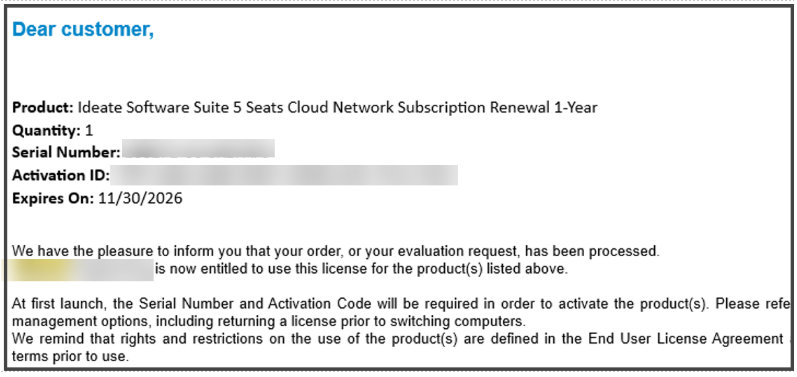
- Watch your inbox: We’ll send your new license information, by the end of December at the latest.
Look for the Graitec – Entitlement certificate email like the one below.
- Download the latest release for Revit 2023–2027 along with the installer
here.
Note: The new license will NOT activate in the June 2026 or previous releases. - Follow the recommended deployment instructions using the Ideate Installer.
- Named User Subscribers
- Set up your Named Users in the Graitec Advantage Portal
- Named User Instructions
- Graitec Advantage portal video
- Cloud Network Subscribers
- There’s no need to assign users
- Once you are up and running, you can review your license usage from the Graitec Advantage Portal
- Using Revit 2022 or earlier? Contact ideatesupport@graitec.com.
- Deploy by March 31, 2027: Install the latest release using your new license.
Questions?
Read the Ideate License Migration FAQ for more details. For any questions about your account, contact ideatesales@graitec.com.
What is a Named User license?
A Named User license is assigned to one specific person rather than shared across a network. For a step-by-step walkthrough, see the Graitec Licensing Help Center - Named User.
Are Ideate Suites replacing Ideate Software Bundles?
Yes. Going forward, Ideate Suites replace Ideate Software Bundles.
What's the difference between the Ideate Software Bundle and the Ideate Suite?
Both include the same five tools: IdeateApps, Ideate BIMLink, Ideate Explorer, Ideate Sticky and Ideate StyleManager.
- Bundle: Each tool is licensed separately, so different people can work in different tools at once. For example, with one Bundle, five people could each use a different tool at the same time.
- Suite: One license covers all five tools for one person at a time. That person can move freely between every tool. While they're using the Suite, it isn't available to anyone else on that license until they finish.
A Named User Suite is assigned to one specific person. A single Network Cloud Floating Suite can be shared across your team, one person at a time.
Will my team need more licenses?
If several people on your team use different Ideate tools at the same time, you may need more than one Suite license. Contact us and we'll review your team's usage and help you choose the right setup.
Can I still buy an Ideate Software Bundle?
No. Bundles are no longer available for purchase. New purchases are offered as follows:
- Ideate Suite: Named User or Network Cloud Floating
- Enterprise Suite: Network Cloud Floating
- Active Host: Network Cloud Floating
- Automation: Named User or Network Cloud Floating
- Individual products: Named User or Network Cloud Floating (IdeateApps, Ideate BIMLink, Ideate Explorer, Ideate Sticky, and Ideate StyleManager)
Can I still buy IdeateApps, BIMLink, Explorer, Sticky, or StyleManager individually?
Yes. Individual products are available as Named User or Cloud Floating licenses until the new product lineup launches with the next major release, expected mid-2027.
Will floating (network) licenses still be available?
Yes. FlexLM remains available for organizations with security requirements, such as environments without internet access. FlexLM is not available through the online store, so please contact your account manager to purchase.
My organization has strict security requirements or no internet access. Can I still get a FlexLM license?
Yes. FlexLM remains available for organizations with security requirements, such as environments without internet access. FlexLM is not available through the online store, so please contact your account manager to purchase.
I'm an existing customer. What happens to my current license/s?
Your existing Ideate Software subscription is moving to our new licensing system at no cost. Your license quantities and expiration dates stay the same.
- Standalone licenses become Named User licenses. Set up your Named Users in the Graitec Advantage Portal.
- Cloud Floating (network) licenses become Network Cloud Floating Suite licenses. Deploy the latest release as you have in the past, using the new license code in your migration email.
- Each Ideate Software Bundle becomes an Ideate Suite.
To keep using Ideate, update to the latest release and activate your new license by March 31, 2027. Older Ideate licenses will stop working in Q2 2027.
Using Ideate with Revit 2022 or earlier? Contact ideatesupport@graitec.com to review your options. For account questions, contact sales@ideatesoftware.com.
I have a Bundle today. What will I receive when I move to the new licensing?
Conversions are one for one. Each Ideate Software Bundle becomes one Ideate Suite, and each network Bundle becomes one Network Cloud Floating Suite. Your license quantities and expiration dates stay the same.
Where do I manage my licenses?
In the Graitec Advantage Portal. Based on customer requests, starting with the latest Ideate release, license management and license usage information are handled in Graitec Advantage, outside of Revit. We recommend bookmarking the portal.
- Named User licenses: Assign licenses to people on your team in Graitec Advantage.
- Cloud Floating Suite licenses: Deploy the latest release with your new license code as you have in the past, then manage licenses in Graitec Advantage.
Watch the Graitec Advantage walkthrough
Can I transfer a Named User license to another person?
Yes. There's no limit on the total number of transfers, but each license can be transferred up to two times within a 30-day period.
How are licenses issued?
Each product on your order is issued as its own license once your order is processed. To try a product before buying, contact us to request an evaluation license.
I want to try the Graitec AI Assistant now, but I don’t have my new license code yet. What should I do?
Existing customers: We’re delivering new license codes to existing subscribers on a rolling basis over the next few weeks. If you need access sooner, contact your Graitec sales representative.
New customers: The Graitec AI Assistant isn’t available in the Ideate trial. Contact your Graitec sales representative to request an evaluation license or purchase a 6-month subscription.
What are the token/costs are associated with using the Graitec Assistant?
There are currently no costs associated with using the AI tokens in the Graitec Assistant. Token usage monitoring will be enabled in the future.
Are there any SSO option to tie into our login/directory?
Currently, we do not have an SSO feature. However, this is something we are planning to add, and we have discussed with R&D integrating it into the Advantage roadmap.
What’s the best way to bulk-add named users – we have 400+?
For bulk-adding named users, the process needs to be completed in two steps:
- Using the template in Advantage, upload the users to the portal.
- Once the users have been uploaded, the customer can select all users and mass-assign the licenses.
Still have a question?
Explore recent posts