

Coordinating Survey Point Data with the Revit Model
With Ideate BIMLink, you can improve the accuracy of staked or installed building components by coordinating survey data with the Revit model. Receive the data via a total station or other device from the project site (typically a CSV file), and then import it as nodes in the Revit project by using Ideate BIMLink to create new generic model elements.
Like mass elements, generic model families can be created from an Excel file. Here’s how:
- Acquire XYZ data from a survey and request an Excel file format with a separate column for X, Y, and Z values.
- Create a Generic Model family to act as a point node or you can use the family called "IdeatePT.rfa" which is located at C:\Program Files\Ideate\Ideate Software 20xx\Ideate BIMLink\en-US\Samples\By Discipline\Construction Links
- Place one instance of the Generic Model family in the project using the Workplane option. NOTE: If the element is placed on a wall or floor or other host, it won't be able to be moved later.
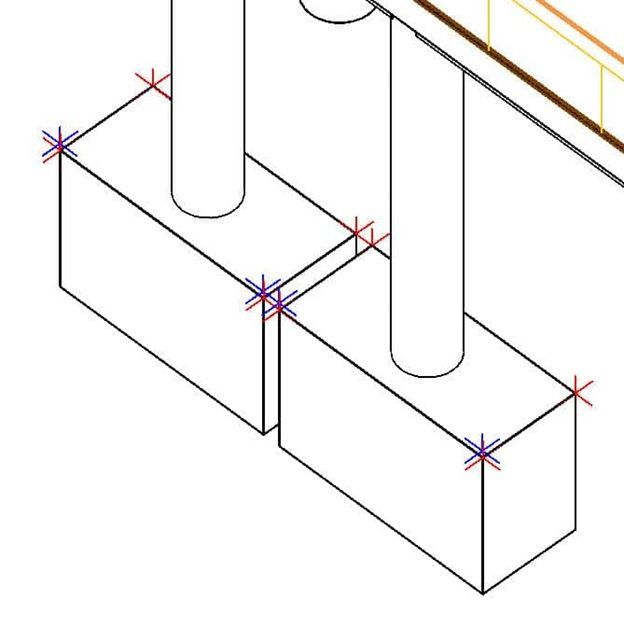
- Create a link based on the Generic Model category, or use the Sample Link called "Generic_Model-Survey_Pts." Include the Point_X, Point_Y, and Point_Z coordinate properties
- Export the link data to Excel. Create a new Excel file
- Copy the X,Y, Z values from the survey data to the corresponding coordinate columns
- For each new survey point, add the word "NEW" in column A (Id).
- Import the changes from Excel
RESULTS: A generic model element located at each of the locations specified in the survey. To prevent them from moving, use the Pin tool.
Explore recent posts

CLIENT TESTIMONIAL - ARTICLE | BladeRoom Group, a leader in modular data center construction, was struggling to manage the complexity of large-scale, data-heavy Revit projects without growing their team.
TRAINING - VIDEO | In this recorded webinar, see how MEP and structural engineers, BIM managers, and Revit power users can take control of complex models without adding more manual work to their day, using Ideate BIMLink, Ideate Explorer, IdeateApps, Ideate StyleManager, and Ideate Sticky.
VIDEO - TRAINING | Watch this webinar to see how Ideate ExportHub, the newest addition to the IdeateApps suite, simplifies Revit export workflows. Learn how to centralize exports, automate batch and scheduled exports, apply intelligent naming rules, and create dynamic sheet and view sets for client deliverables.

TRAINING - VIDEO | Master even the most complex Revit export workflows with Ideate ExportHub, part of IdeateApps, and Ideate Automation.